
Save recipes
Save recipes from Instagram, TikTok, YouTube and any website.
Tap Share, choose Save to FOODIE and keep scrolling. The recipe lands in your library with ingredients and steps, not as one more bookmark you will never open again.
 Try Foodie for free
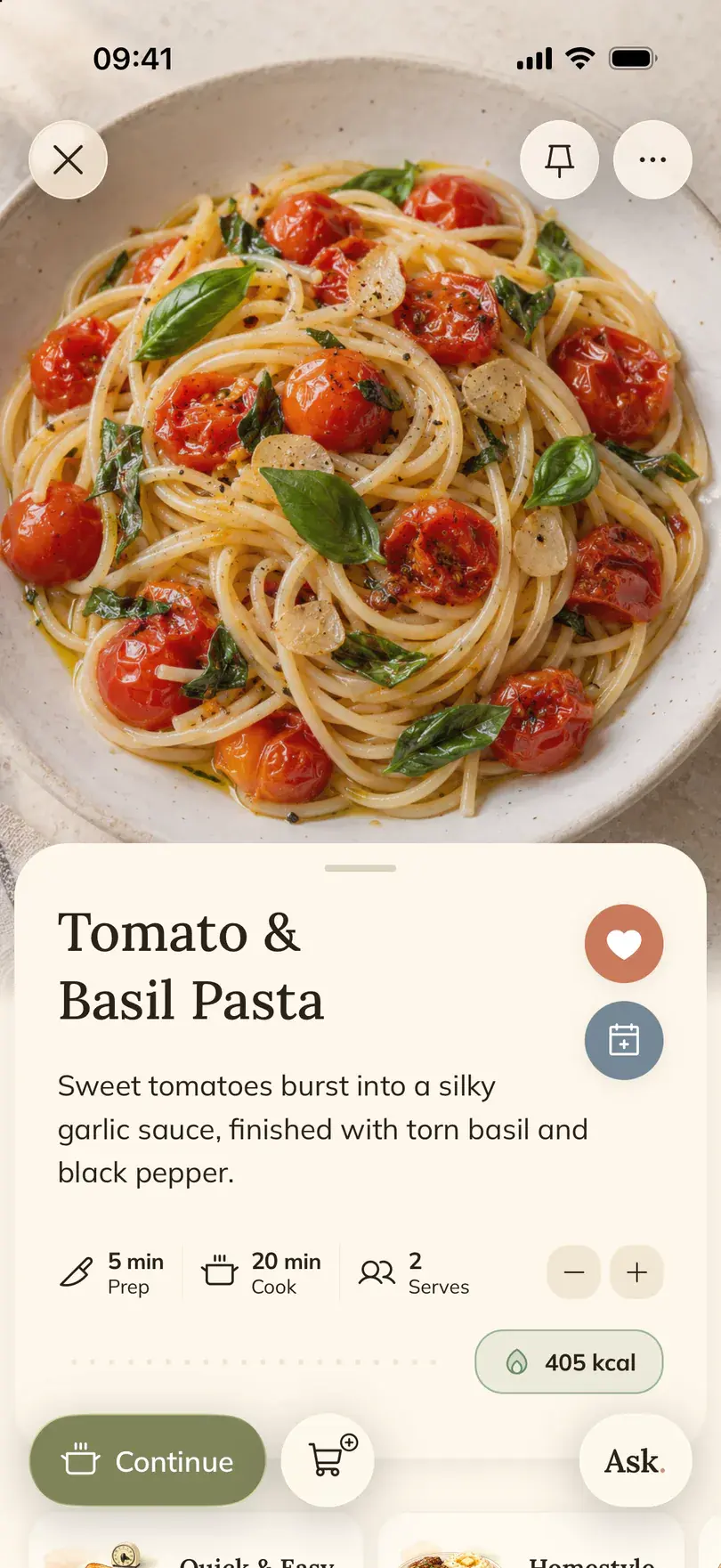

Foodie is a recipe saver app: it turns a Reel, a TikTok, a video or a web page into a recipe you can cook from. You can send it from the share menu on your iPhone or paste a link inside the app, and the recipe is written in the language you picked.
How to do it in Foodie
- 01
Open the recipe where you found it
A Reel, a TikTok, a YouTube video, a Facebook post or a recipe site. Public posts work best, because Foodie needs to see the caption or the page.
- 02
Tap Share
In Instagram, tap the paper plane and then Share to… to reach the iPhone share menu. In other apps, tap Share; in Facebook, tap More under Share to.
- 03
Choose Save to FOODIE
If it is not in the row of apps, scroll to the end of the row and tap More.
- 04
Keep scrolling
You do not have to wait. Foodie reads the caption, the video or the page and saves the recipe to your library. A video takes longer than a text recipe, and Foodie can send a notification when it is ready.
- 05
Or paste a link in the app
Copied a link already? Open Foodie, tap Create, then Paste link, and the recipe is built the same way.
- 06
Check the result before you cook
Open the recipe and look over the amounts and steps. Edit anything that came out wrong, add it to a cookbook or put it on the meal plan.
How-to guides
When it helps
The recipe is hiding in a caption
Instagram creators often put the whole recipe under the Reel. Foodie pulls it out of the caption and lays it out as ingredients and steps.
The amounts are only spoken
Some TikToks never write the recipe down. Foodie works from what the video gives it and estimates the missing amounts, so those are the lines to check.
A blog with a long story first
Nine paragraphs about a summer in Sicily before the ingredient list? You get the ingredient list.
How Foodie reads a video recipe
For a Reel, a TikTok, a YouTube video or a Facebook video, Foodie looks at everything the post gives it: the caption, the words spoken in the video and what is shown on screen. If the caption links to a recipe website, it follows the link. Photo carousels on Instagram and TikTok are read slide by slide. A video takes longer than a web page. When a video never says or shows the amounts, check those lines in the saved recipe before you cook.
Save recipes in the language you cook in
Found a recipe in Italian or Spanish but cook in English? Foodie writes new recipes in the recipe language you choose, so you do not need a separate translation app. Set it before you save: changing the language later does not rewrite recipes already in your library.
- 01
Open Personalization
Open the menu in Foodie, go to Personalization and find App & Recipe Language.
- 02
Turn off Use device settings
While it is on, the choices are greyed out. Turn it off, then pick English, Spanish, German, French, Portuguese, Ukrainian or Italian.
- 03
Save the next recipe
Share a post or paste a link as usual. The new recipe arrives in the language you picked.
Good to know
- A private post or a page that needs a login may not be readable. Use a public link, copy the text, or take a screenshot and add it as a photo.
- When a video never says the amounts, Foodie estimates them. Check those lines before you start cooking.
- The language setting applies to recipes you save after changing it. Recipes already in your library stay as they are.
- Metric or imperial units are a separate choice in Personalization, next to the language.
Common questions
Questions about this feature.
5 answers to the things people ask us most. Tap any question to expand.
Which apps can I save recipes from?
Instagram, TikTok, YouTube, Facebook and any recipe website, plus your own text and photos. Anything that opens the iPhone share menu can send a link to Foodie.
Where is Save to FOODIE in the share menu?
In the row of apps. If you do not see it, scroll to the end of the row and tap More. In Instagram, tap Share to… first to reach the iPhone menu.
Do I have to wait while the recipe is saved?
No. Go back to scrolling. The recipe appears in your library when it is ready, and a notification tells you if you allowed them.
Can Foodie translate a recipe into my language?
Yes, for new recipes. Choose App & Recipe Language in Personalization before saving, and the recipe is written in that language. Recipes you saved earlier keep their language.
What if the video never says the amounts?
Foodie fills in what it can and estimates the rest. Look over the ingredient list before cooking and adjust anything that looks off.
Free tools for this



Guides on this topic
- Instagram saved recipes: from a messy folder to dinners you can cookWhy the Saved tab stops working after a few hundred Reels, what each fix is good for, and how to get the recipe out of a fast video into a place you can cook from.Read the guide
- How to organize recipes from screenshots, links and notebooksScreenshots, phone notes, Pinterest boards, Instagram saves and a stained notebook all work until the evening you need one recipe fast. Here is what each method is good at, where it breaks, and how to pull everything into one place.Read the guide
- Family recipe book: how to save grandma's recipesCollect the cards, ask the right questions while you still can, digitize the handwriting and choose a format your family will actually cook from.Read the guide
More features

FOODIE: Digital Recipe Book
Save the next recipe you see.
Free to download. Next time a Reel makes you hungry, share it to Foodie instead of the bookmark.
Try Foodie for free