
Recipe book
A digital recipe book for every recipe you actually cook.
Grandma's handwritten card, a TikTok you saved at 1 a.m., the blog recipe you make every Sunday. In Foodie they all look the same: ingredients, steps, servings, one tap away.
 Try Foodie for free
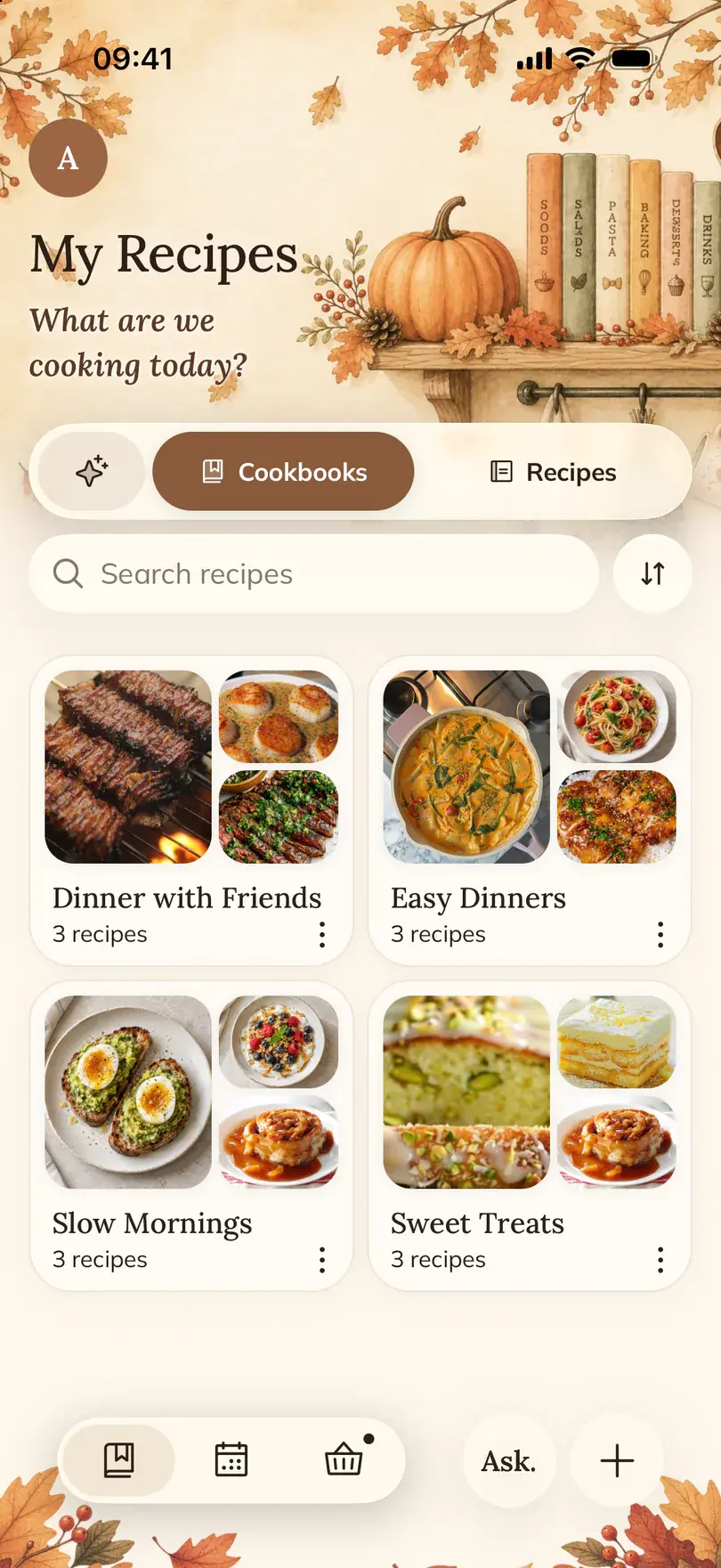

A digital recipe book is one place for your own recipes, wherever they came from. Foodie is a recipe keeper app for iPhone and iPad: you add recipes, sort them into cookbooks and find them again by name or by ingredient.
How to do it in Foodie
- 01
Bring in a few recipes you already cook
Use Save to FOODIE from a share menu, paste a link, or add a recipe from a photo or your own text. Start with the dishes you make most, not with everything you ever bookmarked.
- 02
Make a cookbook
In your recipes, switch to Cookbooks and create one around a real use: weeknight dinners, the family's favorites, baking, things to try.
- 03
Add recipes to it
Open a recipe's options, tap Add to Book and pick the cookbook.
- 04
Keep the regulars close
Mark recipes as favorites, and pin the one you are cooking this week so it is one tap away. Smart lists group your saved recipes by mood and moment on their own.
- 05
Make it your version
Tap Edit and change the ingredients, amounts and steps to match how you really cook it. Want to keep the original too? Ask the AI Chef to adapt the recipe and choose Save as new.
How-to guides
When it helps
Recipes are scattered everywhere
Screenshots, saved Reels, browser tabs, a notes app. One library means one place to look when it is 6 p.m. and you are hungry.
Family recipes on paper
Photograph the card or the notebook page and Foodie turns it into a recipe you can scale, plan and share. The paper stays safe in the drawer.
You changed the recipe
Less sugar, double garlic, no oven. Keep your version next to the original instead of remembering the changes.
Find a recipe by name, by ingredient or by time
Search looks through your recipe names. The filters do the rest: By ingredient finds saved recipes that use what you have and shows which ingredients you are missing, cook time narrows the list to 15, 30, 45 or 60 minutes, and Favorites keeps only the ones you marked.
Good to know
- Foodie has no built-in recipe catalog. Your book starts with the recipes you add, which is the point.
- There is no bulk import from another recipe app yet. Bring over the recipes you really cook, one link, photo or text at a time.
- Recipes live in your account, so they sync between iPhone and iPad when you sign in to the same account. Opening them needs an internet connection.
- A few useful cookbooks are easier to keep up than many overlapping ones. Use favorites for repeat meals and cookbooks for themes.
Common questions
Questions about this feature.
5 answers to the things people ask us most. Tap any question to expand.
What is a digital recipe book app?
An app where your own recipes live in one format, whatever their source. In Foodie you add recipes from links, photos and text, then organize them in cookbooks, favorites and pins.
Can I keep the original recipe and my changed version?
Yes. Ask the AI Chef from the recipe for the change you want, then choose Save as new on its proposal. The original stays as it was.
Can I import everything from another recipe app?
Not in one go. Add the recipes you want to keep from their links, photos or text. Most people find they only cook a few dozen of them anyway.
Do my recipes sync between iPhone and iPad?
Yes, when both devices are signed in to the same Foodie account. A guest account stays on one device.
Can I print a recipe or keep it as a PDF?
With a subscription you can export a saved recipe as a PDF. For a recipe link you have not saved yet, the free Recipe link to PDF tool works in the browser.
Free tools for this


Guides on this topic
- How to organize recipes from screenshots, links and notebooksScreenshots, phone notes, Pinterest boards, Instagram saves and a stained notebook all work until the evening you need one recipe fast. Here is what each method is good at, where it breaks, and how to pull everything into one place.Read the guide
- Family recipe book: how to save grandma's recipesCollect the cards, ask the right questions while you still can, digitize the handwriting and choose a format your family will actually cook from.Read the guide
- Instagram saved recipes: from a messy folder to dinners you can cookWhy the Saved tab stops working after a few hundred Reels, what each fix is good for, and how to get the recipe out of a fast video into a place you can cook from.Read the guide
More features

FOODIE: Digital Recipe Book
Start your recipe book with three recipes.
Free to download. Add the three dishes you cook most this week and the book starts to fill itself.
Try Foodie for free