
Grocery list
A grocery list made from your recipes, with only what you need.
Open a recipe, tap the cart, tick the two things you are out of, and they are on the list. Same for a whole planned week.
 Try Foodie for free
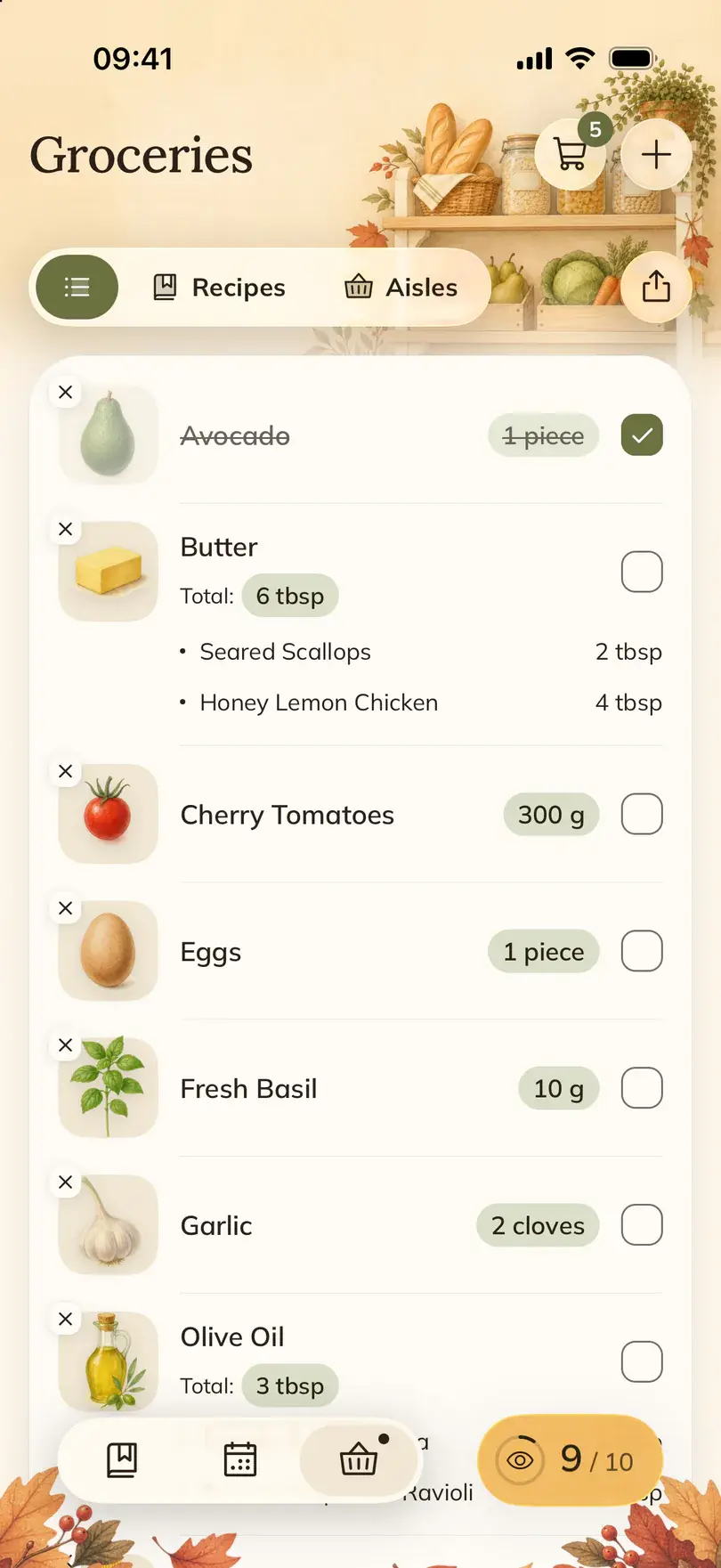

Foodie's grocery list is built from the recipes you saved. The ingredients you pick land in Groceries, the same ingredient from different recipes is grouped, and you can view the list by ingredient, by recipe or by aisle.
How to do it in Foodie
- 01
Open the recipe's ingredients
Open a saved recipe and look at Ingredients. Check what is already in your fridge and cupboard.
- 02
Add one ingredient or all of them
Tap the cart on the recipe. In Choose ingredients, tick only what you are missing, or Add all for the whole recipe.
- 03
Or start from the meal plan
In the Meal tab, tap the cart icon on a planned day, then tick what you need or tap Add all.
- 04
Review the list in Groceries
Switch between Ingredients, Recipes and Aisles. Aisles groups the list by section of the store.
- 05
Tick items off in the store
Check off what is in the basket and turn on Remaining to see only what is left. Share shopping list sends a copy to whoever is doing the shop.
When it helps
The weekly shop
Plan the dinners, choose their ingredients from the plan and you have one list for the whole week.
One thing missing
You have everything for the soup except leeks. Add the leeks, not the soup.
Someone else is shopping
Send them the list from Groceries, so they buy what the recipes need and nothing you already have.
Good to know
- Matching ingredients are grouped, but different units (grams and cups, say) may stay on separate lines. Read the quantities instead of assuming they were added up.
- If a recipe's amounts were estimated from a video, check them before you buy.
- Planning a meal does not add its ingredients by itself. You decide what goes on the list.
Common questions
Questions about this feature.
5 answers to the things people ask us most. Tap any question to expand.
Is there a grocery list app that builds the list from recipes?
Foodie does. Pick ingredients from any saved recipe or from a planned day, and they go to Groceries, grouped by ingredient, recipe or aisle.
Can I add just one ingredient?
Yes. Tap the cart on the recipe and tick only that ingredient in Choose ingredients.
Can I add the ingredients for my planned meals?
Yes. Tap the cart icon on a planned day in the Meal tab, review the selection and add it.
Are quantities combined into one unit?
Not always. The same ingredient is grouped, but amounts in units that cannot be combined stay separate.
Can I share my grocery list?
Yes. Use Share shopping list in Groceries to send a copy.
Free tools for this

Guides on this topic
- Easy meals to prep: a weekly menu in 15 minutesA short planning routine, a sample week you can copy, and batch cooking that saves weeknights without eating your whole Sunday.Read the guide
- What should I have for dinner tonight?A five-minute way to decide, built around what is already in your kitchen, plus the staples and dinner formats that make it work most nights.Read the guide
- How to get better at cooking when you already cook from recipesYou can follow a recipe. The next step is knowing why it works, and having someone to ask when the sauce will not thicken.Read the guide
More features

FOODIE: Digital Recipe Book
Make your next grocery list from recipes.
Free to download. Plan two dinners, choose their ingredients and walk into the store with one list.
Try Foodie for free