
Cooking mode
Cooking mode: step by step recipes with the amounts right there.
Flour on your hands? Tap anywhere for the next step, with a knuckle if you have to. Swipe right to check the one before. The screen stays on the whole time.
 Try Foodie for free
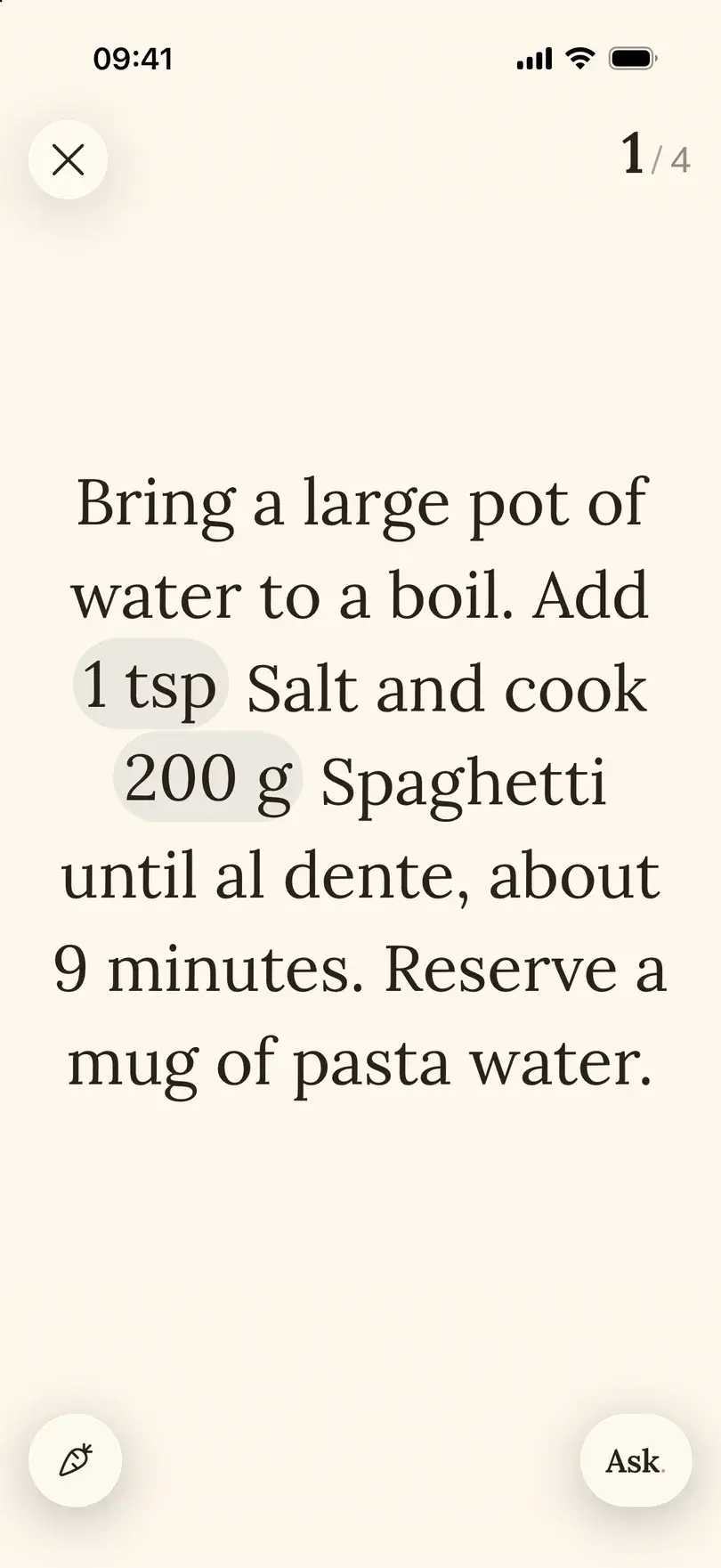

Cooking mode shows a saved recipe one step at a time. Each step carries the amounts it needs, so you do not scroll back up to the ingredient list with sticky fingers.
How to do it in Foodie
- 01
Open the recipe and set the servings
Cooking for four from a recipe for two? Change the servings first, so the amounts in the steps match.
- 02
Tap Cook
Cooking mode opens on the first step, with the ingredient amounts written into it.
- 03
Tap to move on
Tap anywhere on the step to go forward. Swipe right to go back and check something.
- 04
Check the list or ask
Ingredients shows the full list. Ask opens the cooking assistant with this recipe already loaded.
- 05
Finish, or pick up later
The screen stays awake while cooking mode is open. Tap through the last step or close it; if you leave halfway, Continue on the recipe takes you back to the step you were on.
When it helps
Messy hands
Raw chicken, dough, oil. One tap with a knuckle beats unlocking a phone that has gone dark.
More people than the recipe
Change servings once and every amount follows, in the ingredient list and inside the steps.
Something is missing
No cream for the sauce? Ask the assistant from the step you are on and keep going.
Change servings without doing the math
Use the minus and plus buttons on a recipe to change the number of servings, one person at a time. Ingredient amounts change in the list and in the cooking steps. It is a change for this meal, not for the saved recipe: tap Edit when you want the recipe itself to change. Cooking time and pan size do not grow in the same proportion as the ingredients, so check the method when you double a recipe.
Metric or imperial, for every recipe
In Personalization, choose Metric (grams, litres, °C) or Imperial (pounds, ounces, °F), or let Foodie follow your iPhone. Amounts and oven temperatures in every recipe follow that choice, so a recipe from an American blog shows grams if that is how you cook.
Ask the AI cooking assistant about this recipe
Ask opens Foodie's assistant with the recipe you are cooking as context, so you can ask about a substitution or a technique without copying anything into another chat.
- 01
Open the assistant from the recipe
Tap Ask on the recipe or in cooking mode.
- 02
Ask something specific
"What can I use instead of cream in this sauce?" or "How do I fold the egg whites in?" Mention what you have and what you want to change.
- 03
Decide what to keep
A reply does not change your recipe. When the assistant proposes a changed recipe, tap Update this recipe to apply it or Save as new to keep both.
Good to know
- Cooking mode is not hands-free: you move with taps and swipes. It saves the scrolling and keeps the screen on.
- There are no timers inside the steps, so keep your phone's timer or the oven's handy.
- Changing servings does not change per-serving nutrition, and it does not rewrite the saved recipe.
- Check the assistant's suggestions like you would a friend's advice before they go into the pan.
Common questions
Questions about this feature.
5 answers to the things people ask us most. Tap any question to expand.
Is Foodie's cooking mode completely hands-free?
No. You tap to go forward and swipe right to go back. It keeps the screen awake and shows one step at a time, so there is much less touching.
How do I go back a step?
Swipe right on the step.
Do ingredient amounts change when I change servings?
Yes. They follow the number of servings in the ingredient list and inside the steps.
Should I double the cooking time too?
Not automatically. A bigger pot or a fuller tray changes the timing in its own way. Check the method and cook until done.
Can I ask the AI assistant for a substitution?
Yes. Tap Ask, say which ingredient is missing and what you have, and review the suggestion before cooking.
Free tools for this


Guides on this topic
- How to get better at cooking when you already cook from recipesYou can follow a recipe. The next step is knowing why it works, and having someone to ask when the sauce will not thicken.Read the guide
- Easy meals to prep: a weekly menu in 15 minutesA short planning routine, a sample week you can copy, and batch cooking that saves weeknights without eating your whole Sunday.Read the guide
- What should I have for dinner tonight?A five-minute way to decide, built around what is already in your kitchen, plus the staples and dinner formats that make it work most nights.Read the guide
More features







FOODIE: Digital Recipe Book
Cook your next recipe step by step.
Free to download. Save a recipe, tap Cook and leave the phone on the counter.
Try Foodie for free