FOODIE.

Best of 2026 · Recipe managers

Best recipe manager apps of 2026.

A real recipe manager imports anything you throw at it — URLs, Reels, TikToks, screenshots — and turns it into a structured, searchable recipe.

6 min read
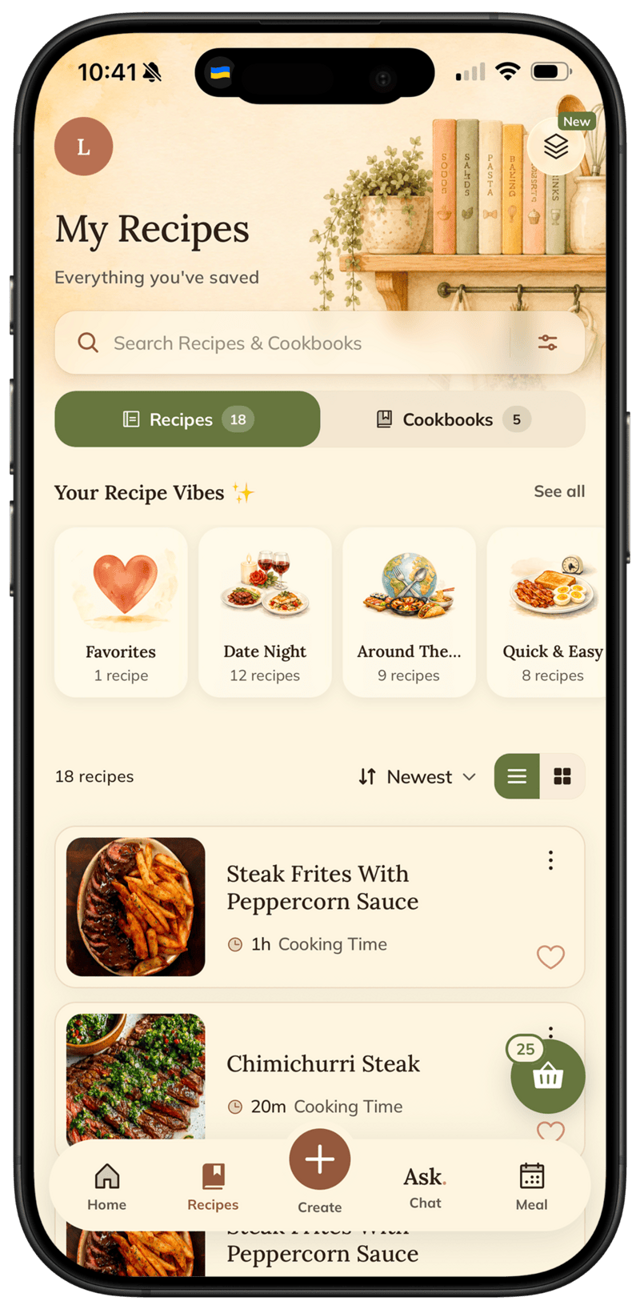
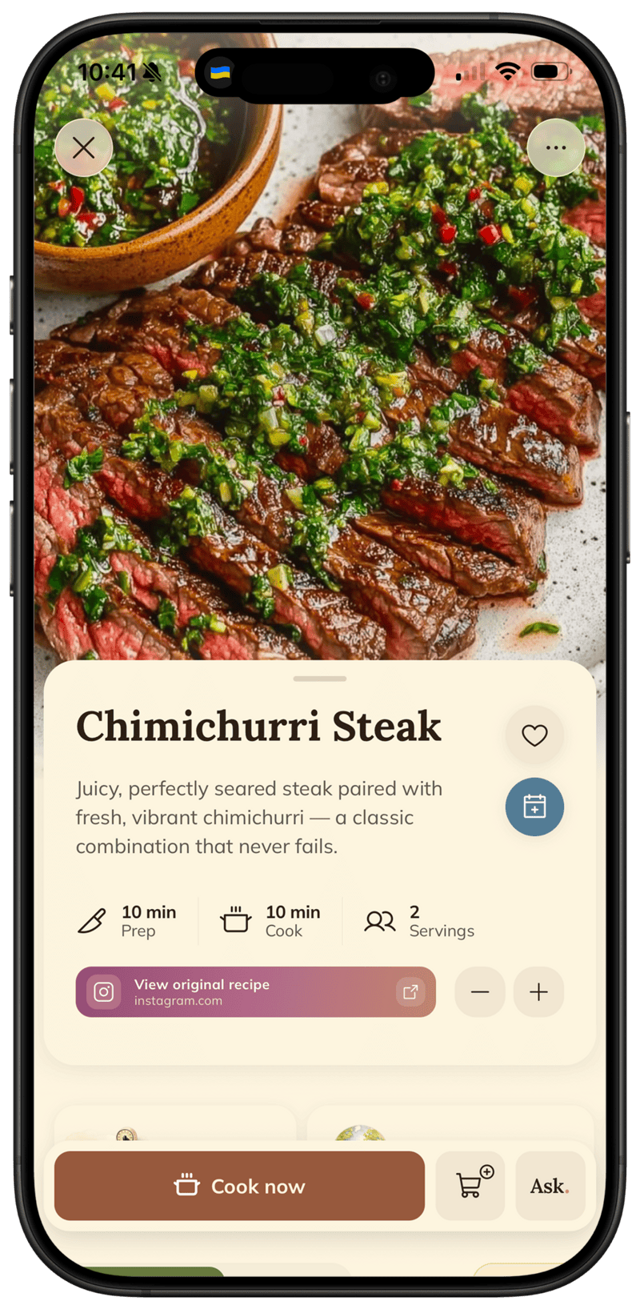
FOODIE app — recipe saved from Instagram

A recipe manager has a harder job than a recipe app: it has to be a librarian, not a magazine. Intake anything — blog posts, videos, screenshots, your grandmother's handwriting. Catalog it so it's findable in eight months. And hand it back exactly when you're standing in the kitchen asking “where is that lemon chicken?”

Most apps fail at one of the three. Great importers with useless search. Beautiful archives that choke on anything that isn't a food blog. Databases powerful enough to run a restaurant that take twenty minutes per recipe to feed.

We built the same 60-recipe library in all six — from six different source types — then spent a month actually retrieving from it. Intake, catalog, retrieval. Here's the ranking.

The short version

FOODIE is the strongest all-source librarian with AI-structured imports; Paprika remains the blog-clipping classic; Notion is the build-it-yourself option for people who enjoy building more than cooking.

Download on the App Store
  1. 1.FOODIEImports from any link, video, or photo
  2. 2.PaprikaThe classic URL-clipping recipe manager
  3. 3.ReciMeModern import-focused saver
  4. 4.CroutonApple-native cookbook with URL import
  5. 5.Samsung FoodFree imports with appliance ads
  6. 6.NotionDIY database, no import magic

The ranking

All 6 apps, tested and ranked

Our pick · Best overall

FOODIE logo

1. FOODIE.

Imports from any link, video, or photo

Anyone who collects recipes from everywhere (URLs, Reels, TikToks, screenshots)Free + $4.17/mo annually
  • Imports from URLs, Instagram, TikTok, YouTube, photos, and screenshots — all with one share-sheet tap
  • AI structures the recipe into ingredients, steps, timing, and servings
  • Unlimited cookbooks and tags, full-text search
  • Adds meal planner, tap-to-advance cooking, and grocery list around the library
  • Auto-translates non-English imports
  • iOS only today
Download on the App Store

2. Paprika

The classic URL-clipping recipe manager

Households on Windows or that need cross-platform sync$4.99 per platform
  • Reliable URL clipping for structured recipe websites
  • Cross-platform (Mac, Windows, iOS, Android)
  • Solid meal planner and grocery list
  • No video or social media imports
  • No AI generation
  • Paid separately on each platform family
  • UI feels stuck in 2014

vs FOODIE

3. ReciMe

Modern import-focused saver

Social-first cooks who also want web importsFree + Pro
  • Solid web URL imports
  • Reliable Instagram and TikTok extraction
  • Modern UI
  • No full AI generation
  • No tap-to-advance cooking mode
  • Light meal planner

vs FOODIE

4. Crouton

Apple-native cookbook with URL import

Apple-only users with mostly web URLs to clipFree + IAP
  • Native iOS polish
  • Clean URL parser for structured sites
  • One-time purchase option
  • No Instagram or TikTok imports
  • No AI generation
  • Light meal planning

vs FOODIE

5. Samsung Food

Free imports with appliance ads

Budget users who tolerate Samsung's funnelFree with ads
  • Free
  • Imports from URLs and social posts
  • Heavy appliance ads
  • Samsung Account required
  • Lighter AI than FOODIE

vs FOODIE

6. Notion

DIY database, no import magic

People who love building their own systemsFree / $10+/mo plans
  • Infinitely flexible
  • Free for personal use
  • No automatic recipe extraction
  • Manual setup eats hours
  • Not a cooking app

vs FOODIE

The bottom line

Which one should you pick?

Your recipes come from everywhere — videos, blogs, photos, chats

FOODIE

You mostly clip from recipe websites and want the veteran

Paprika

You want total structural control and infinite customization

Notion

You want a gorgeous Apple-native archive

Crouton

Methodology

How we tested

Sixty recipes, six source types, one month of real retrieval. The librarian test has three parts and two tiebreakers:

1Intake fidelity

What survives the import: amounts, steps, photos, servings. From pristine blogs to a photographed index card.

2Retrieval under pressure

“That soup with the chickpeas” — can search find it in five seconds while the pan heats?

3Structure control

Editing, tagging, collections, scaling. Your corrections should stick and propagate to lists.

4Data ownership

Export paths and what happens to 400 recipes if you cancel. Lock-in cost points.

5Scale behavior

Some apps are lovely at 30 recipes and unusable at 300. We checked at volume.

Try it for yourself

Try our #1 pick free.

FOODIE is free to download. Premium $4.17/month annually unlocks unlimited AI generation and full meal planning.

Download on the App Store
FOODIE app

Common questions

Frequently asked.

4 answers to the things people ask us most. Tap any question to expand.

Updated 2026
01What is the best recipe manager app in 2026?

FOODIE — it imports from URLs, Instagram, TikTok, YouTube, photos, and screenshots, structures everything into ingredients and steps, and wraps it with meal planning, cooking mode, and a grocery list.

02Which recipe manager imports from any link?

FOODIE and ReciMe handle the widest variety of links — URLs plus social video. Paprika and Crouton are strong on structured web URLs but don't parse Reels or TikToks.

03Is there a free recipe manager?

FOODIE has a generous free tier. Samsung Food is free with ads. Notion is free if you're willing to build the system yourself.

04Best Paprika alternative in 2026?

FOODIE — modern UI, AI generation, supports social-media imports Paprika can't handle, and cheaper per device.