Guide · Cooking
How to cook hands-free with greasy fingers.
No more pinch-zooming with a knuckle. FOODIE's cooking mode is built for the messy reality of a real kitchen.

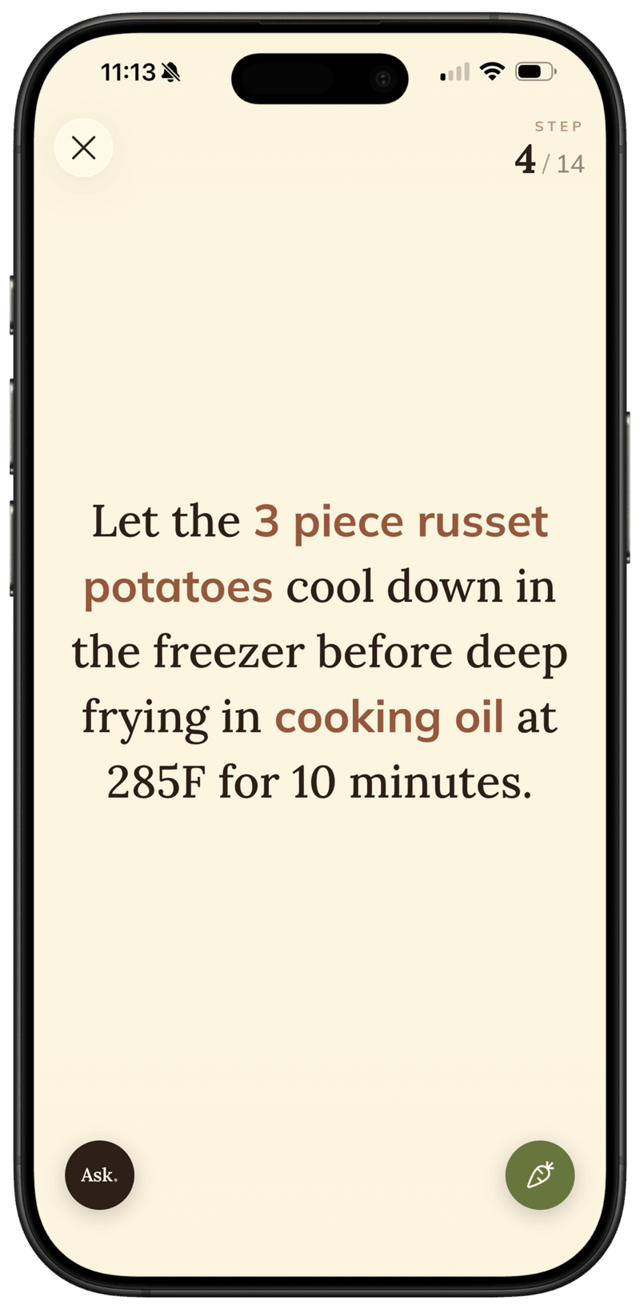
No more pinch-zooming with a knuckle. FOODIE's cooking mode is built for the messy reality of a real kitchen.
Cooking from a recipe on your phone usually means: screen turns off, you wipe your fingers, you scroll back to find the ingredient list, you smudge the screen with oil. FOODIE's cooking mode is built so you can keep cooking — not keep tapping.
Step by step
6 steps · 1 minute.
- 1
Open any saved recipe.
Pick a recipe from your cookbook and tap into it. The cooking mode launches automatically when you're ready to cook.
- 2
Big, auto-scaling text.
Each step fills the screen with text sized to be readable from across the counter — short steps, long steps, always legible. No squinting or pinch-zooming.
- 3
Smart ingredient highlights.
Quantities and ingredients pop in orange so you spot "2 tbsp butter" or "3 cloves garlic" instantly, even at a glance.
- 4
Tap anywhere to advance.
When a step is done, tap anywhere on the screen — knuckle, elbow, the back of a spoon — and FOODIE moves to the next step. Swipe left to go back.
- 5
Quick access to the AI chef and ingredients.
Stuck on technique or need a substitution? Tap Ask to chat with the AI sous-chef without losing your place. Want to double-check the ingredient list? It's one tap away and brings you back exactly where you stopped.
- 6
Screen stays on.
FOODIE keeps the display awake the entire time you're cooking — no more swiping with butter on your fingers because the screen blacked out.
Pro tips
From people who do this every week.
- ✦
Prop your phone in landscape on a stand — the auto-scaling text becomes huge and readable from across the kitchen.
- ✦
Use Ask for the small questions you'd usually Google — "how thin should I slice this?" — without ever leaving the recipe.
- ✦
If a step references an ingredient you forgot to prep, jump to the ingredient list and back in two taps.
Why FOODIE for this
Made for exactly this workflow.
Most recipe apps just shrink the recipe website into your phone. FOODIE's cooking mode was designed from scratch for the way people actually cook — sticky fingers, divided attention, things on the stove.
Try it for yourself
Try FOODIE today.
Free to download. Premium $4.17/month annually. Save your first recipe in under a minute.
Common questions
Frequently asked.
4 answers to the things people ask us most. Tap any question to expand.
01Does FOODIE listen for voice commands?
No — there are no voice commands today. Cooking mode is built around tap-to-advance: a single tap anywhere on the screen moves to the next step, and a swipe sends you back.
02Can I check the ingredient list without losing my place?
Yes. There's a quick ingredient peek that pulls up the full list and returns you to the exact step you were on.
03Does the screen really stay on the whole time?
Yes. While cooking mode is open, FOODIE keeps the display awake so you don't have to wake the phone with greasy hands.
04What if a step is unclear or I need a substitution?
Tap Ask to open the AI sous-chef chat — it knows the recipe you're cooking, so its answers fit exactly what's in front of you. No copy-paste into ChatGPT.
Related
Keep reading.
How to save Instagram recipes
Stop hoarding bookmarks. Turn any Instagram Reel or post into a real, searchable recipe in under 10 seconds.
ReadHow to translate recipes
The best Italian recipe is in Italian. The best Spanish recipe is in Spanish. FOODIE saves them in your language.
ReadHow to meal plan for the week
Five dinners, one Sunday, no decision fatigue. The simple method that actually sticks.
ReadFOODIE vs Paprika
the classic paid recipe manager
ReadFOODIE vs Crouton
the Apple-native cookbook
ReadFOODIE vs ReciMe
the social-recipe saver
ReadWhy hard-boiled eggs get a grey-green ring — and the fix
That discoloured halo around the yolk is iron meeting sulfur — and a 30-second tweak at the end of cooking stops it entirely.
ReadHow to tell when oil is hot enough (without a thermometer)
Three fast checks pros use to read pan heat before food hits the oil.
ReadThe grandfather method for clear chicken stock
One old-world trick — starting the chicken in cold water — gives you a stock so clear you can almost read through the pot.
Read