
Guide · AI cooking
Find a meal in what you already have.
Tell the Foodie cooking assistant what is in your fridge, review the suggestion, and save the recipe you want.
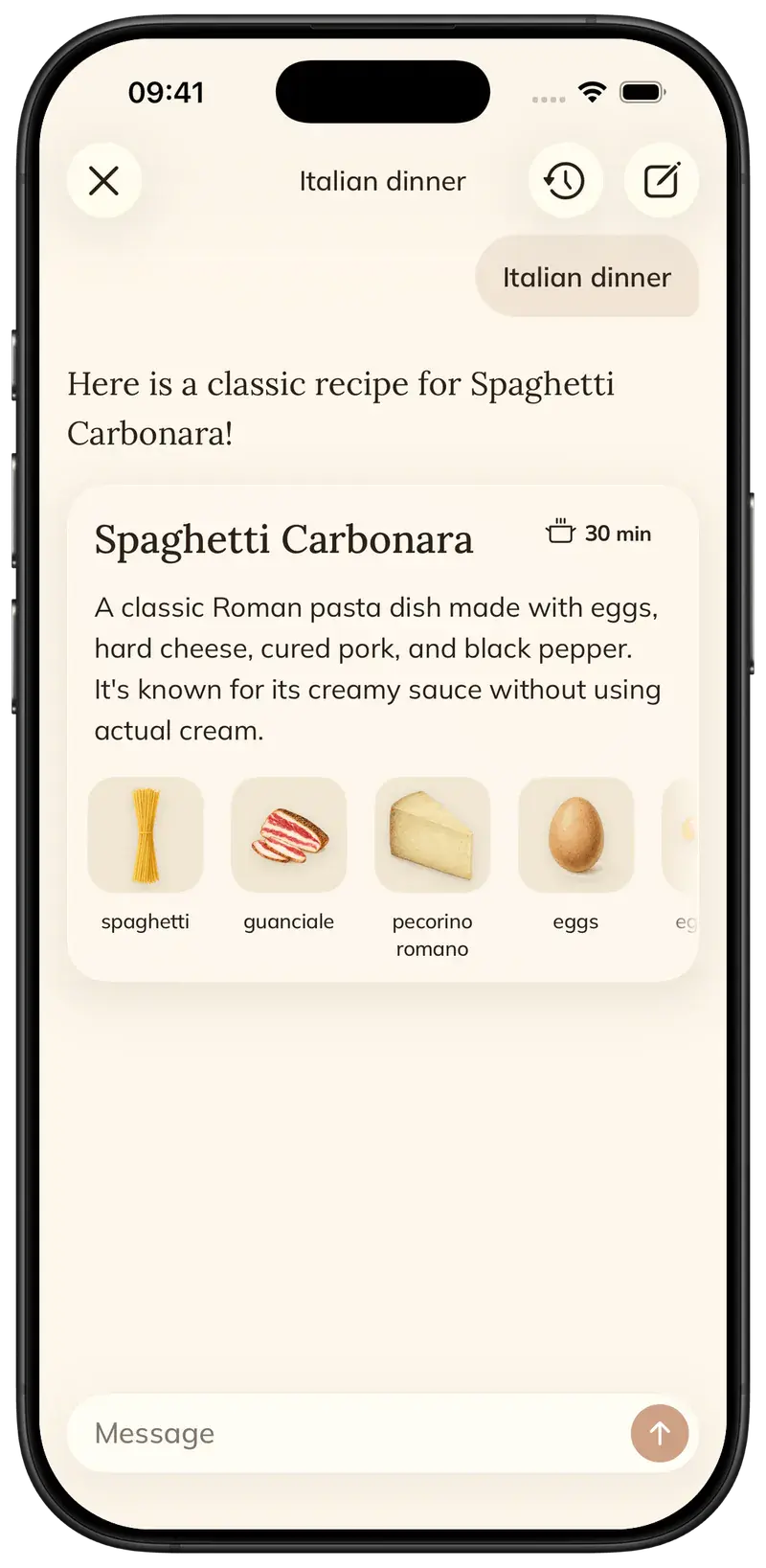
Start with the ingredients you have and the kind of meal you want. Add your preferences, review the suggestion and ask for changes before saving it.
Step by step
5 steps · 3 min
- 01
Open the cooking assistant
Open Ask / Chat in Foodie. For a new dish, start a conversation rather than opening a question attached to an unrelated recipe.
- 02
List your ingredients
Write what you have and roughly how much: for example, two eggs, leftover rice and half a zucchini. Add pantry staples you are happy to use.
- 03
Describe the meal you want
Mention the number of people, available time and any ingredients you want to avoid. Ask the assistant to keep extra shopping to a minimum.
- 04
Review the proposed recipe
Check the ingredients, quantities and steps. Ask for a change if the suggestion needs something you do not have or does not suit your plans.
- 05
Save the version you want to cook
Use Save Recipe on the proposed recipe. Open the saved version, check the details and choose Cook now when you are ready.
Pro tips
Small details that help.
- Specific quantities help more than a vague list such as “some vegetables.”
- Mention leftovers explicitly; the assistant cannot inspect your fridge on its own.
- A suggestion may still include additional ingredients, so review the list before cooking.
How FOODIE: Recipe Saver helps
The conversation can lead to a structured recipe you keep in your collection, rather than an answer you have to copy into a separate app.
FOODIE: Recipe Saver
Try it in Foodie.
Free to download. Premium $4.17/month annually. Start with a recipe you want to cook.
 Try Foodie for free
Common questions
Frequently asked.
4 answers to the things people ask us most. Tap any question to expand.
Does Foodie know what is in my fridge automatically?
No. Tell the assistant what you have and what you want to use.
Can I ask for a quicker version?
Yes. Include the time you have available or ask for a simpler version of the proposed dish.
Will it avoid all extra shopping?
You can request that, but review the suggested ingredient list before deciding to cook it.
How do I keep the result?
Use Save Recipe on the recipe proposal, then find the saved recipe in your library.
How to meal plan for the week
Pick a day, add a saved recipe, then choose the ingredients you want to buy.
GuideHow to make a grocery list from recipes
Choose individual ingredients, add a whole recipe, or select ingredients from your meal plan.
Comparison

FOODIE vs Paprika
Recipe management across Apple, Android, and Windows
Comparison
FOODIE vs Yummly
Yummly is discontinued: options for former users

