
Best of 2026 · Social saves
Best apps for saving recipes from social media.
Recipe importers for turning saved social posts into ingredients and cooking steps.
At a glance
| App | Best for | Pricing | Works on |
|---|---|---|---|
 FoodieOur pick | Keeping recipes from Instagram, TikTok, and YouTube in one collection | Free · $24.99 for the first year (50% off), then $49.99 a year, or $4.99 a month | iOS, iPadOS |
 ReciMe | Saving social recipes on iPhone or Android | Free tier with weekly import limits; paid subscription available | iOS, iPadOS, Android, Web |
 CookBook | Collecting social recipes alongside a household cooking routine | Free for 20 recipes and 20 smart imports; paid upgrades available | iOS, Android, Web |
 Recipe Keeper | Keeping recipes across Apple, Android, and Windows | Free to try; check the store for upgrade terms | iOS, iPadOS, Android, Windows, macOS |
Foodie, ReciMe, CookBook, and Recipe Keeper document social recipe imports. Support varies by network: Instagram or TikTok support does not automatically include YouTube. Choose an app that supports the sources you actually use.
The ranking
All 4 options compared
Our pick
FOODIE: Digital Recipe Book

Your favorite recipes, beautifully organized and ready to cook. Save from videos, websites, photos, or text, then bring your cookbooks, meal plan, grocery list, and step-by-step cooking together in one thoughtfully designed app.
- Pricing
- Free · $24.99 for the first year (50% off), then $49.99 a year, or $4.99 a month
What works well
- Save recipes from social media, websites, photos, and text
- Organize cookbooks, plan meals, and add ingredients to a grocery list
- Follow cooking steps and ask the AI assistant for ideas or changes
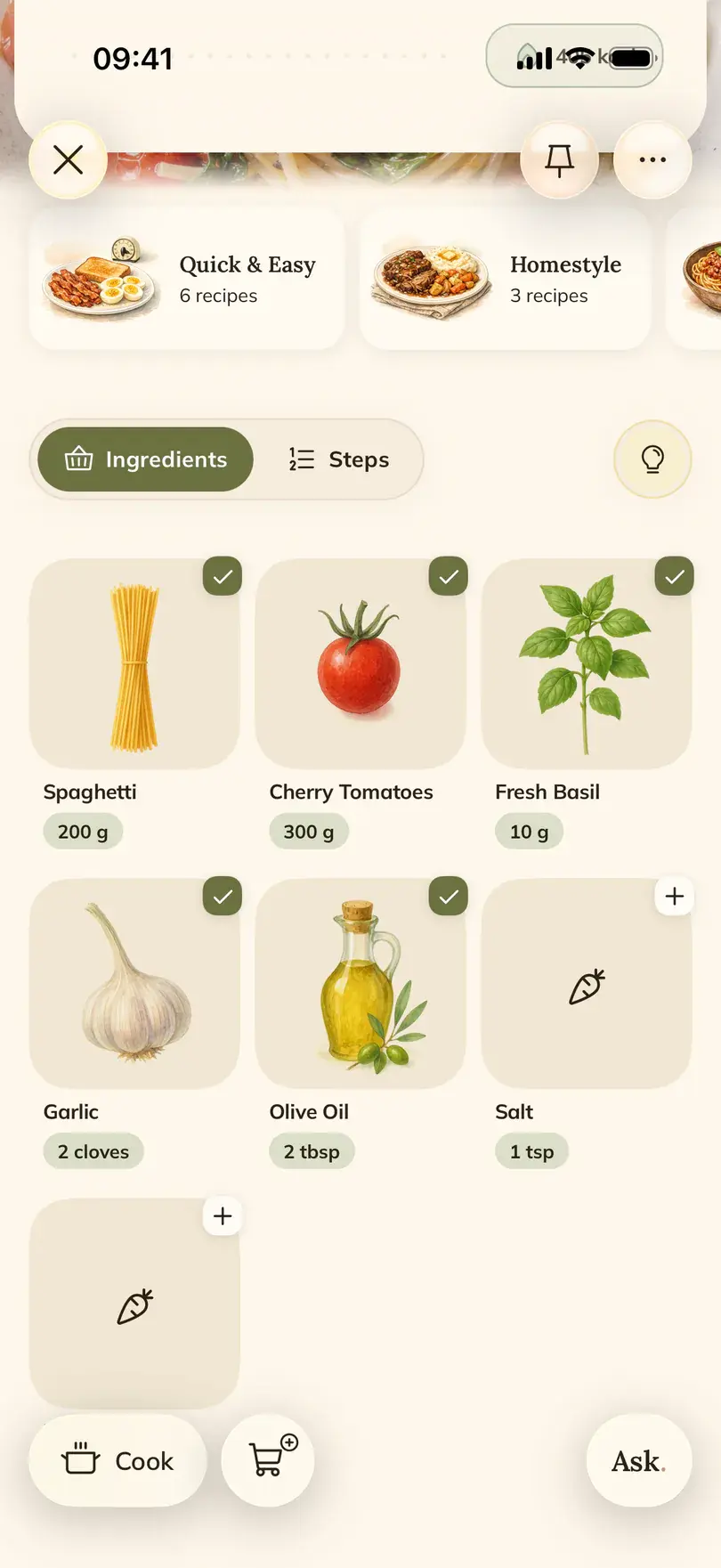
- Thoughtful design, with visual ingredients and a clear cooking view
- Analyzes the cooking video itself, not just its transcript
Keep in mind
- Available for iPhone and iPad; check the app for current free limits
- Saving a recipe can sometimes take longer because Foodie analyzes the full video
Inside FOODIE: Digital Recipe Book
ReciMe
ReciMe saves social recipes into cookbooks and connects them to a weekly meal plan and grocery list. It supports iPhone, iPad, Android, and the web; guided cooking and PDF exports are part of its paid plan.
- Pricing
- Free tier with weekly import limits; paid subscription available
What works well
- Imports from Instagram, TikTok, YouTube, and other supported sources
- Cookbooks, a weekly meal planner, and grocery lists
- App available in English, Spanish, German, French, and Portuguese
Keep in mind
- Free imports have a weekly allowance
- Step-by-step cooking and some other tools require a paid plan
How saved recipes look in ReciMe
CookBook
Recipe imports, shared planning, and cooking tools
- Pricing
- Free for 20 recipes and 20 smart imports; paid upgrades available
What works well
- Imports from Instagram, TikTok, and other supported sources
- Recipe scanning, search, and translation tools
- Meal planning, shopping lists, and cooking mode
Keep in mind
- Check the plan limits before moving a large collection
- Import results depend on the information in the source
How saved recipes look in CookBook
Recipe Keeper
A recipe collection across phones, tablets, and computers
- Pricing
- Free to try; check the store for upgrade terms
What works well
- Imports from websites, Instagram, and TikTok
- Photo scanning for printed or handwritten recipes
- Recipe organization, shopping lists, and a meal planner
Keep in mind
- Check upgrade and sync terms for each platform you use
- Scanned or imported recipes may need editing
How saved recipes look in Recipe Keeper
The bottom line
Which one should you pick?
Save a recipe
How saving from social actually works
Supported sources and import methods differ by app. Start with a public post from a platform your chosen app supports.
- Share the post or copy its link
Open the post’s share menu and choose your recipe app, or paste the copied link into its importer.
- Review the imported recipe
Some apps use a written caption or linked recipe page; others also process audio or video. Check the ingredients, quantities, and steps against the source.
- Organize it for cooking
Save the result to your collection. Add it to a meal plan or grocery list if those features are included in your app and plan.
Methodology
How we compared
This comparison was updated on October 22, 2026 using the publishers’ websites, help pages, and store descriptions linked below each app. It compares documented features, not measured performance or a hands-on test score. Features, limits, and prices can vary by plan, region, and app version.
- 01Recipe sources
- We distinguish structured recipe imports from saving a link or manually copying text.
- 02Planning and cooking
- We identify calendars, grocery lists, and cooking tools, including paid-plan requirements.
- 03Devices and access
- We compare supported platforms and free-versus-paid access. Check the official page before subscribing.
Try it for yourself
Try our #1 pick free.
Start your own recipe collection with Foodie, free to download. A subscription removes the limits: $24.99 for the first year (50% off), then $49.99 a year, or $4.99 a month.
Try Foodie for freeCommon questions
Frequently asked.
01How should I choose a recipe app?
Try one recipe from a source you use often. Check the ingredients, edit a quantity, find it again, and try the cooking and shopping tools you need. Also check the devices used by your household.
02Are all of these apps free?
Check the publisher’s current plan and store listing before paying. Free allowances, regional prices, and included features can change.
03Can an imported recipe need corrections?
Yes. Missing amounts, incomplete instructions, private posts, or unavailable source material can affect an import. Review the saved result against the original before cooking.
